Docker Host Security Monitoring: Protecting the Foundation of Your Containers
2026-06-18T12:00:00.000000Z
By 2027, Gartner predicts that 90% of companies will run their business on containerized applications. It's a staggering figure. But here is the truth: your containers are only as secure as the host they live on. If the foundation is weak, the entire structure is at risk. High-quality docker host security monitoring should be your silent partner, not a source of constant noise and confusion.
It's frustrating when security tools feel like a "black box" or demand a massive enterprise budget. You want to know your host is safe without sacrificing your privacy to a third-party cloud. We agree. This guide shows you how to spot hidden threats and automate your defenses using open-source tools that respect your data sovereignty. You'll learn how to use the avai host telemetry tool and AI-driven analysis to get clear, human-friendly answers about your system's health. Let's find a quieter, smarter way to stay protected.
Key Takeaways
- Understand why the host kernel acts as the shared brain for your containers and how a single host breach can compromise your entire stack.
- Identify the critical telemetry points for effective docker host security monitoring, including hidden auto-start programs and suspicious network activity.
- Discover how local AI analysis protects your privacy by keeping sensitive telemetry on your own hardware instead of feeding it to cloud providers.
- Learn to implement a lightweight, automated monitoring workflow that uses clear, color-coded risk ratings to simplify your security decisions.
- See how the avai host telemetry tool and AI Security Analyst translate complex technical findings into plain-English advice you can act on immediately.
Why Host Security is the Foundation of Docker Stability
Think of your Docker host as the foundation of a house. If the concrete cracks, the rooms above don't stand a chance. Many teams spend all their energy locking individual container doors while leaving the basement window wide open. In 2026, we're seeing a major shift in how experts handle protection. The focus has moved from chasing individual container "ghosts" to a more grounded approach: host telemetry.
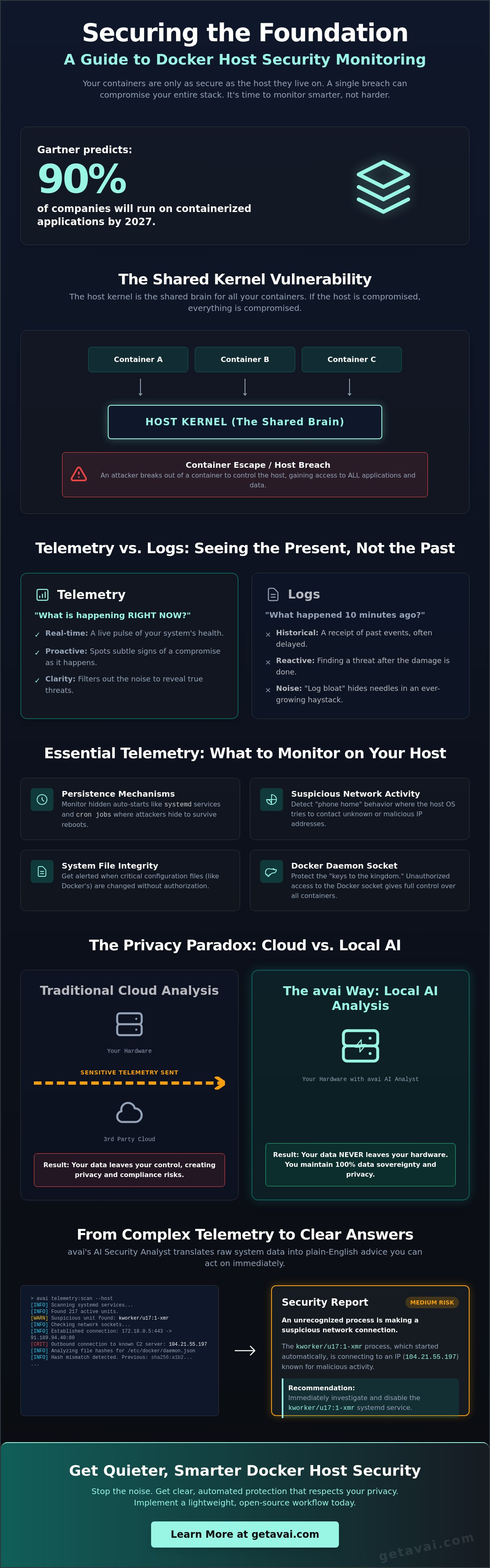
The host kernel is the shared brain of every container you run. It's the central nervous system. When a container wants to write a file or send a network packet, it asks the host for permission. If an attacker gains control of that host, they don't just own one container; they own the entire fleet. This is why docker host security monitoring is so critical. It's the practice of quiet, proactive observation of the underlying operating system to catch trouble before it can spread.
The Shared Kernel Vulnerability
How do containers actually work? They use system calls to talk to the host OS. It's a constant, rapid-fire conversation. Modern containerization technology relies on this shared access to stay lightweight and fast. However, this efficiency creates a specific risk known as a "container escape." An attacker might try to "break out" of their isolated container to reach the host kernel. Once they're out, the walls between your applications vanish. Monitoring the host is simply more efficient than the alternative. Why try to watch 100 individual containers when you can monitor the one kernel they all share? It's about working smarter, not harder.
Telemetry vs. Logging: Knowing the Difference
Most people confuse logs with telemetry. They aren't the same. Logs are like a store receipt; they tell you what happened ten minutes ago. Telemetry is like a pulse; it shows you what is happening right now. In a busy Docker environment, logs can quickly become a "black box" of noise. This "log bloat" makes it almost impossible to find a real threat hidden among millions of routine lines of text. You can't find a needle in a haystack if the haystack grows by a ton every hour.
Host telemetry is the vital signs of your server's health. By watching the host's actual behavior in real time, you can spot the subtle signs of a compromise without drowning in data. Effective docker host security monitoring filters out the noise. It gives you clarity. It helps you sleep better knowing your foundation is solid and your data is staying exactly where it belongs.
Essential Telemetry: What to Watch on Your Docker Host
Most security guides tell you to scan your images for vulnerabilities. That's a good start. But what happens once those containers are actually running? Real docker host security monitoring focuses on the host's behavior in the wild. You need to watch the specific spots where attackers actually hide. It's about looking past the containers and seeing the foundation they sit on.
Malware doesn't always announce itself with a 100% CPU spike. Sometimes it's a quiet background process that starts every time your server reboots. It waits. It watches. It stays small to avoid detection. You should also keep a close eye on your system files. If a critical Docker configuration changes without your permission, that's a red flag. Even physical threats matter. A rogue USB device plugged into a server can bypass even the best digital firewalls. It sounds like a movie plot, but it's a real risk for on-premise hardware.
Monitoring for "phone home" activity is another vital step. Is your host OS trying to reach an unknown IP address in a different country? Legitimate Docker traffic usually follows a predictable pattern. Anything outside that pattern needs a closer look. If you want to simplify this process, using an automated telemetry tool can help you watch these variables without manually digging through logs every hour.
Monitoring Auto-Starts and Background Processes
Persistence is the goal for any attacker. On a Linux host, they often establish this through systemd services or hidden cron jobs. These are the "dark corners" of your operating system. Hidden background processes are often more dangerous than active container spikes because they are designed to be invisible. A reliable monitoring tool should check these common hiding spots every few minutes. A daily scan isn't enough; you need to catch changes as they happen to maintain a true sense of safety.
Network and Socket Security
The Docker daemon socket is essentially the keys to the kingdom. Official Docker Engine security guidance emphasizes protecting this socket above almost everything else. If an attacker gets access to it, they can run any command they want with root privileges. You must monitor for unauthorized access attempts or unusual outbound connections from the host OS itself. Distinguishing between legitimate container traffic and suspicious data exfiltration is the hallmark of a mature security strategy. It's not just about stopping connections; it's about understanding which ones belong and which ones don't.
Cloud vs. Local Analysis: Solving the Security Privacy Paradox
Why do we send our most sensitive system data to a third-party cloud just to keep it safe? It feels like giving a stranger the keys to your house so they can check if the doors are locked. In the past, we didn't have much of a choice. Large security firms claimed that AI was too heavy to run on your own hardware. They insisted that "cloud-scale" was the only way to be effective. That changed in 2026. Now, docker host security monitoring can happen right where the data lives, on your own machine.
Cloud-based monitoring has a hidden price that goes beyond the monthly bill. Your telemetry often becomes the training set for someone else's algorithms. You're effectively paying a subscription to help a corporation build their product using your private system maps. Local analysis breaks this cycle. It eliminates the "black box" mystery of cloud security. You see what the tool sees. You keep what the tool finds. It's a grounded approach that prioritizes your autonomy over a provider's data collection goals.
There's also a massive speed advantage. When a threat appears on your host, every millisecond counts. Waiting for a round-trip to a cloud server and back creates a dangerous window of opportunity for an attacker. Analyzing threats locally means you can react at the speed of your own CPU. It turns your security from a delayed notification into a real-time shield. You gain protection without the lag.
The Risks of Off-Boarding Telemetry
Off-boarding data creates a digital trail that shouldn't exist. Even with strong encryption, "data in transit" remains a potential target for sophisticated actors. In 2026, staying compliant with data sovereignty laws like GDPR and CCPA isn't just a legal chore; it's a competitive necessity. Many developers are moving toward self-hosted security stacks to regain total control. The NIST container security guide highlights the importance of host-level isolation. Sending raw telemetry to a cloud provider often blurs those lines of defense, making it harder to prove where your data actually resides.
Local AI: The Quiet Security Analyst
We don't need massive data centers to spot a threat anymore. Small, efficient AI models can now identify malware patterns directly on your server. This is the breakthrough we've been waiting for. It's a "Privacy-First" way to handle docker host security monitoring on sensitive production servers. Tools like the AI Security Analyst interpret findings locally, giving you clear, human-readable advice without ever "phoning home" with your raw data. It's fast, it's quiet, and it's incredibly precise. Local analysis means your secrets never leave your host.
Implementing a Lightweight Monitoring Workflow in 2026
You don't need a massive DevOps team to watch your server foundation. Many online forums suggest building complex, heavy stacks that take weeks to tune and maintain. We think that's the wrong approach. You want a workflow that works for you, not a setup that requires a second job just to manage the alerts. Effective docker host security monitoring should feel like a natural, quiet part of your environment.
Let's break down a modern, low-friction workflow into four manageable beats. First, choose a tool that runs as a lightweight background service. It should be a quiet observer that stays out of the way of your actual work. Second, define your risk tolerance using clear, color-coded ratings. This helps you ignore the "noise" and focus only on what matters. Third, automate your scans to run every few minutes. In 2026, efficient scanning means catching threats in real time without causing CPU spikes that lag your containers. Finally, use a dashboard that translates technical findings into plain English. If you can't understand the problem in five seconds, the tool isn't doing its job.
Avoiding Security Tool Bloat
"Set and forget" is the gold standard for busy developers. You have enough on your plate without managing a fleet of heavy security agents that eat up your RAM. The goal is a low-impact agent that doesn't steal resources from your production containers. Selecting tools that use standard formats, like JSON, or offer a simple web dashboard ensures your stack stays lean. This approach avoids the friction of enterprise-scale tools while providing the same level of vigilant protection. It's about being a silent partner in the background, not a constant interruption.
Interpreting Results Without a PhD
Cryptic error codes and long strings of hexadecimal data are the enemies of speed. When a threat is detected, you shouldn't have to spend an hour on a search engine just to understand the alert. Plain-English explanations are vital for a fast response. Color-coded risk levels (red, amber, green) help you prioritize your morning in seconds. This clarity moves you from "What is this?" to "What should I do next?" without the typical technical intimidation. If you're ready to stop drowning in logs and start seeing your host clearly, you can get started with the avai host telemetry tool to see how simple security can be.
avai: Transparent, Open-Source Monitoring for Docker Environments
Security shouldn't feel like a heavy burden. We've already explored why the host foundation matters and why cloud-based "black boxes" can be a risk to your privacy. Now, it's time to look at a solution designed to solve these problems without the typical enterprise headache. The avai host telemetry tool is built for developers who value autonomy and simplicity. It's a tool that works for you, not for a corporate data harvester.
avai acts as a quiet watchdog for your system. It automatically checks the hiding spots where threats like to linger, such as auto-start scripts and critical system files. Because it's open-source under the MIT license, you can see exactly how it works. There are no hidden backdoors. There's no secret data collection. It's a grounded approach built on the belief that transparency is the only real way to build trust in docker host security monitoring. You get a professional-grade defense that stays entirely under your control.
Your data stays yours. This is the core principle behind everything we build. While other tools insist on sending your telemetry to a central cloud for "processing," avai keeps every bit of information on your Docker host. Your system maps, network patterns, and file changes never leave your hardware. You gain the benefits of advanced threat detection without the risk of off-boarding your secrets to a third party. It's the ultimate fix for the security privacy paradox.
How avai Watches Your Host
avai takes what we call a "Quiet Observer" approach. It monitors network connections, USB devices, and system files in the background with almost zero impact on your container performance. It doesn't scream for attention with constant alarms; it provides clarity when you need it. You can get instant visibility by running avai via Docker or Pip. It's designed to be up and running in minutes, giving you a steady, reliable pulse on your host's health without any complex configuration.
From Data to Action
Raw data is only useful if you can act on it. That's where the AI Security Analyst comes in. Instead of handing you a list of cryptic error codes, it interprets findings into human-readable advice. You can see your host's health through a simple, local web dashboard that translates technical risks into plain English. For every detected issue, the local AI provides a clear recommended action. It moves you from uncertainty to a resolution in seconds. If you're ready to secure your foundation, you can protect your host for free with avai on GitHub and start seeing what's really happening under the hood.
Secure Your Foundation Without the Noise
Your host is the quiet engine driving every container you run. Protecting it shouldn't feel like a full-time job or a compromise on your privacy. By focusing on host telemetry rather than just noisy logs, you can catch threats before they have a chance to spread. We've shown how local analysis and lightweight workflows can replace the "black box" mystery of traditional cloud security providers. You deserve a solution that respects your data sovereignty while providing vigilant protection.
It's time to move toward a more transparent, grounded approach. You can enjoy professional docker host security monitoring while keeping every bit of your system data on your own hardware. No hidden fees. No corporate data harvesting. Just clear, human-readable insights. It's security built for the way you actually work.
Ready to take the next step? You can Download avai for free on GitHub to see the difference for yourself. It is MIT licensed open source software that uses local AI analysis to keep your systems safe. There is zero data collection involved. Security is finally about trust and simplicity, and we are here to help you achieve both.
Frequently Asked Questions
Is Docker host security monitoring different from container scanning?
Yes, they're different but they work together. Container scanning checks your application images for known flaws before they run. Docker host security monitoring watches the actual ground your containers live on. It looks for live threats, like unauthorized system calls or suspicious network connections, that image scanners simply can't see.
Does avai send any of my server data to the cloud for analysis?
No, your data never leaves your machine. We built the avai host telemetry tool to respect your privacy. All analysis happens right on your server using local AI. This means your secrets stay under your control, and you don't have to worry about cloud providers using your system maps for their own training.
How much CPU overhead does a background security monitor use?
It's designed to be a quiet, low-impact observer. You won't see the heavy CPU spikes common with enterprise security agents. By focusing on essential telemetry instead of every single log line, the tool stays light. Your container resources stay available for your applications, where they belong.
Can I run avai inside a Docker container to monitor the host?
Yes, you can deploy avai as a container. It's a popular choice for quick visibility. By mounting specific host directories, the tool can look "out" of the container to watch the underlying host. It's a simple way to get protection up and running in just a few minutes.
What are the most common hiding spots for malware on a Linux host?
Malware loves the "dark corners" of your OS. Common spots include auto-start scripts, systemd services, and hidden cron jobs that run after a reboot. It might also hide in temporary folders or masquerade as a legitimate system process. Monitoring these specific areas helps you spot trouble before it settles in.
Is avai really free and open-source?
Yes, it's completely open-source under the MIT license. You can find the code on GitHub and use it however you like. We believe transparency is the best way to build trust in security tools. There are no hidden costs or locked features; just honest, community-driven protection.
Do I need to be a security expert to understand avai's reports?
No, you don't need a PhD in cybersecurity. The AI Security Analyst does the heavy lifting for you. It translates complex technical findings into plain-English advice. You get clear, color-coded risk levels and simple steps to fix any problems the tool finds. It's like having a friendly expert looking over your shoulder.
How often should I run security scans on my Docker host?
You should monitor your host continuously. Attackers don't wait for a weekly scheduled scan to make their move. Running automated checks every few minutes is the best way to catch persistence or unauthorized changes. It gives you a real-time pulse on your system's health without slowing down your work.